Download app
TailScribe is what is called a progressive web app (PWA), which is basically any complex website that you can interact with and share information with.
Of course, this has its limitations. Notably it's not as easy to use on your phone. Luckily, we can fix this by downloading TailScribe as an app directly to your device.
Prerequisites
An internet-enabled device
Overview
You can download TailScribe for improved convenience and functionality. This will vary depending on your device.
Android - Chrome
Method 1
- Scroll to the bottom of the home page
- Click the "Launch as Web App" button
- Click the "Install App" option
- Click the "Install Automatically" option when prompted

Method 2
- Open your menu
- Click the "install app" option
- Select the "Add Automatically" option.

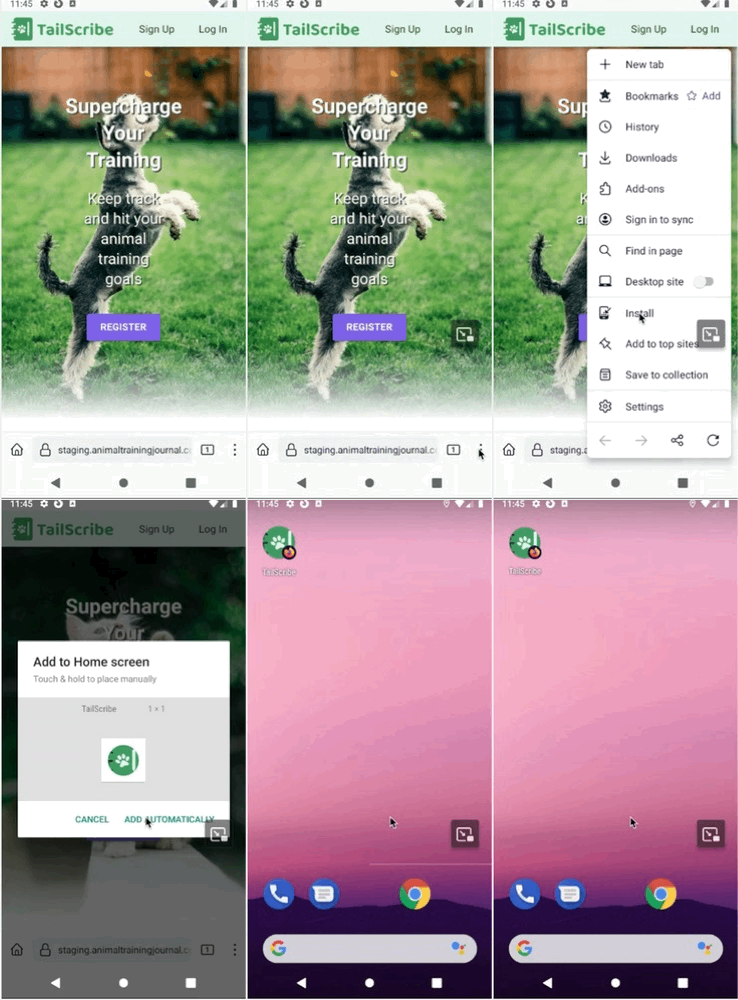
Android - Firefox
- Open your menu
- Click the "install" option 3: Select the "Add Automatically" option
Android - Opera
- Open your menu
- Select the "home screen" option
- Follow the prompts to add automatically and install.

iPhone (iOS) - Safari
- Scroll to the bottom of your screen and select the share icon.
- Navigate to the "Add to Home Screen" Option.
- Select the name you want it to have, then select "Done"