Cue Analysis
As you add more cues to your pet, you will need to be aware of multiple things, Cue Analysis currently answers two questions:
1: Out of all of my cues, am I reusing any?
2: Out of all of my cues, is there any way my pet can get confused?
Cue Analysis solves this by checking the phonetics of each word that you have in your cues and telling you their calculated similarity. It warns you if your cues are too similar.
Prerequisites
This guide assumes that you have created a pet, added skills and cues, and also that you have an active TailScribe Premium subscription.
Overview
Cue Analysis functions automatically for you as you add your cues. You can access it by checking the skills page for your pet.
For each of your skills, you should see a dropdown. Select the bottom arrow to open the dropdown.
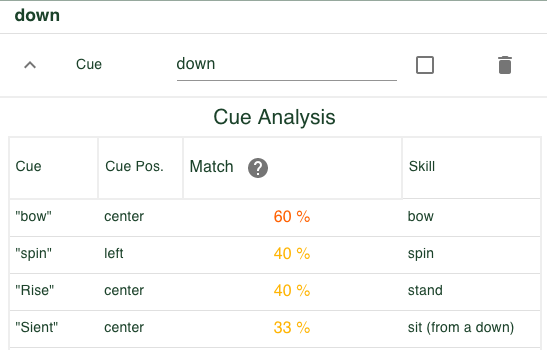
Here you can see your cue compared to every single cue for your pet. Each comparison is given a match %, ranging from 0 - 100%. 100% means "These are the exact same word", and 0% means "These two words have absolutely nothing in common." The words at higher risk of collision are going to show closer to the top.
For each cue shown, it will display the cue in question, the skill it belongs to, and which variant, (left, right, center), it works for. This is to enable you to find the correct skill/cue combo and potentially proof or adjust your cues.
If you have any cues that are at risk or will likely need your attention, you will see a red badge with a count on top of the dropdown button.
And that's it! You should now have an understanding of Cue Analysis, how it works, and how you can use it in your training.