Add a Note
Time to start Adding notes!
Prerequisites
In order to add notes you need to have either added a pet to your own account or been invited to share a pet with another user.
Adding a note
Navigate to your pet's page. This can be done via your dashboard.
At the bottom navigation you will see a tab for "Notes" - click it.
There are many types of note options, for this tutorial we will stay with the simplest. Click "New Note".
Here you can put in your note. You have options for a time, (default, now), the note content, and any tags you want to use to identify the note later.
Fill out the note and then click the "Save New Note" button. You will automatically be redirected back to the "Notes" page.
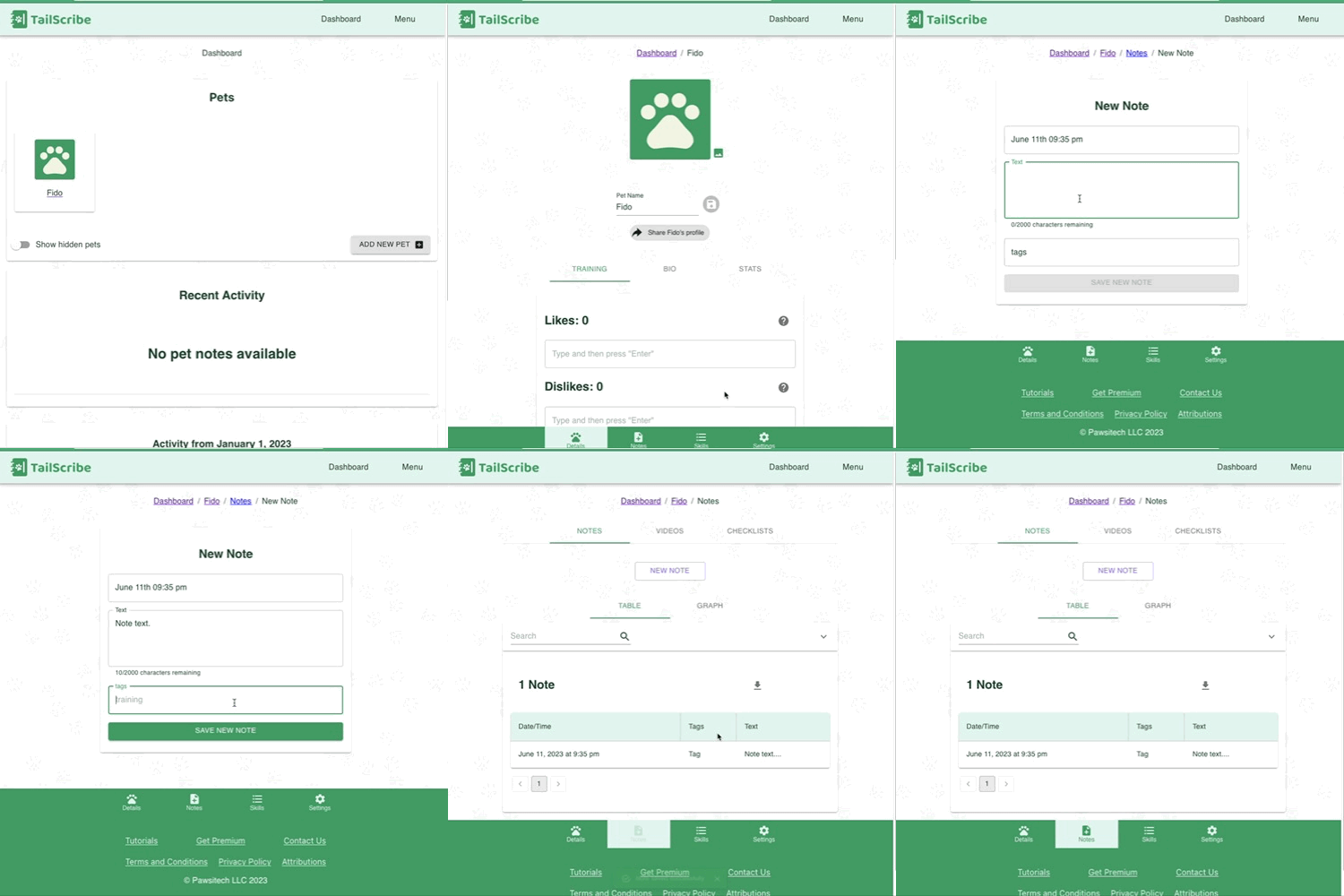
And you have just added your first note! Congratulations!
What's next?
From here on you have everything you need to make use of TailScribe! To learn more about notes, visit the Notes deep dive, the Videos deep dive, or the Checklists deep dive.
To learn more about all of the options in the Pet Pages, visit the next tutorial where we start Tackling pets in-depth!